
The promise gets lost.
The person is in your phone, but the useful context is in a note, email, or your memory.
For independent consultants who own the follow-up
Scan a business card or capture a contact, keep the context, and schedule the next follow-up before the details fade.
The fast path is designed for a straightforward capture in under 60 seconds from scan to schedule. The applicable app store may offer a trial.
Your follow-ups
The person, the context, and the next action.
Send workshop outline
Recent activity
Inside the Android app
Capture the person, keep the context and come back when it is time to act.
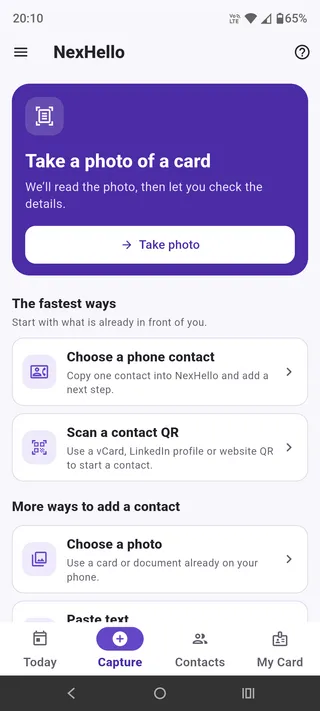
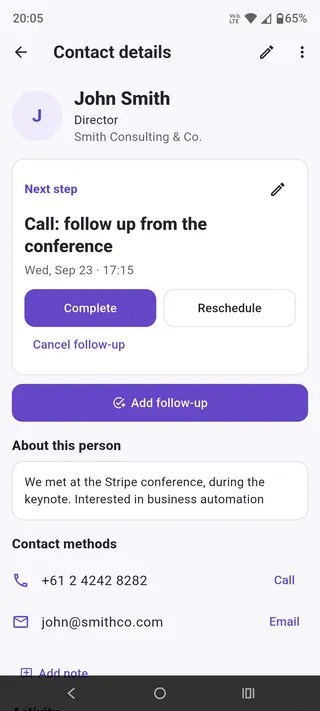
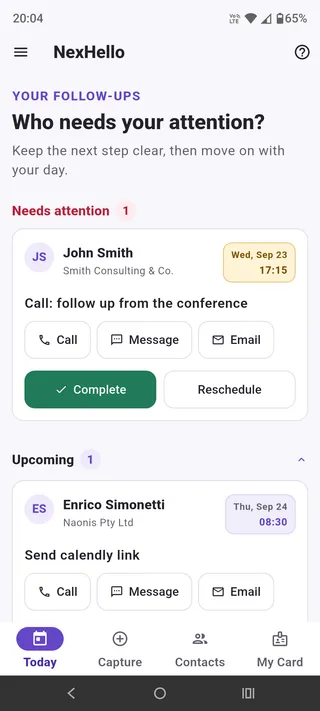
Android screenshots from September 2026. Appearance may vary by device and app version.
After the meeting
Your phone saves the contact. Your CRM manages qualified work. NexHello handles the gap in between.
The person is in your phone, but the useful context is in a note, email, or your memory.
The proposal, introduction, or answer waits while the next piece of work starts.
Without the original context, the follow-up feels generic or gets delayed.
A small daily habit
Save a useful record without perfecting every field while the conversation is still fresh.
Use a business card photo, contact QR, phone contact, copied text, or manual entry.
Save the useful fields now. Fix the rest later if you are in a hurry.
Write down what mattered and what you promised.
Give it a date. Return to Today to do it, move it, or close it.
Before the CRM
NexHello keeps the early relationship record together. Hand it to your CRM or another workflow when the work is ready.
Name and number, but no promise or due date.
Useful detail, separated from the person and the action.
Powerful when the opportunity is qualified; heavy for every new introduction.
Person + context + scheduled actions + outcome.
Start with what you have
Every route leads to the same review. Save now and correct the source later if needed.
Read a business card locally, confirm the useful fields and keep its recognised source for later remapping.
Scan supported vCard, MECARD or direct contact details, then check the fields before saving.
Copy one existing contact into an editable review without changing the source address book.
Turn an email signature or contact block into fields you can check.
Use the short, predictable route when typing is genuinely faster.
Share your local vCard as a QR code or contact file when the conversation begins.
Save now. Fix later.
NexHello keeps recognised source text and mapping history with the contact. You can review and improve it later, even if the original image is no longer linked.
For independent consultants
You meet prospects, clients, partners, and referrers. Then delivery work resumes. NexHello keeps the next action in view without adding another CRM.
Independent CRM, automation, integration and implementation consultants.
Discovery calls, workshops, partner meetings, referrals and networking conversations.
Team pipelines, campaign automation, forecasts, lead routing or shared CRM administration.
Clear answers
The fast path is designed for a straightforward capture in under 60 seconds. The actual time depends on the source, device, and workflow.
No. NexHello handles the small but important gap between the conversation and your established system. It keeps the person, context and clear next actions together, then supports deliberate CSV or webhook handoff.
Yes. NexHello reads a business card photo on your device and lets you check the fields before saving. The recognised source stays available for later review.
Core contacts, recognised source text, notes, follow-ups, activity and My card are stored by the app on your device. Business card images are saved in your Photos or Gallery when the platform supports it, while NexHello keeps a reference. There is no automatic cloud backup or multi-device sync; the data is yours, in your device.
Yes. Add a dated next action and optionally enable a local notification.
The app includes CSV export and optional integration capabilities. After saving a contact, open it and tap “Send to your system” to send it through an HTTPS webhook you configure. Contacts are never sent automatically; this is a flexible handoff, not a built-in native CRM integration.
NexHello is a subscription based product. The applicable app store may offer a trial. The purchase screen shows the current price based on your country, billing period, renewal, cancellation and any trial terms before you confirm.
The app is live on Android. iOS release setup and a public listing are still pending, so join the iPhone waitlist for updates.
Practical guides
Simple ways for consultants to keep the person, context, and next action together.
Learn how to scan business cards, dictate useful conversation notes and set follow-up reminders after a conference, so your next conversation has context.
Read guide →Use the real conversation to write a specific message with one clear next step.
Read guide →A simple way to capture a useful conversation and give it one clear next action.
Read guide →A short client meeting note that keeps the person, the promise, and the next action together.
Read guide →After the conversation